ML template with DVC and MLflow
Introduction
Our Emily template with Data Version Control (DVC) and MLflow is aimed at typical MLOps workflows such as data analysis and preprocessing, model engineering, and staging final machine learning (ML) models to production.
The main idea of this template is to utilize two popular MLOps frameworks, DVC and MLflow, and integrate them into a common ML pipeline. By harnessing the power of Emily, you will have a fully-configured installation of DVC and MLflow that works out-of-the-box. And the best thing? It only takes a few minutes to install!
There is significant overlap in functionality between DVC and MLflow, so one can combine them in different ways. In this template, we use DVC for dataset versioning and MLflow for experiment tracking. More details about this combination in given in the Table below. A full breakdown of the capabilities are found in the core capabilities section.
| DVC | MLflow |
|---|---|
| ✅ Dataset versioning | ✅ Experiment tracking |
| ✅ ML model versioning | ✅ Experiment dashboard |
| ✅ Data pipeline management | ✅ ML model server |
Once the experimentation phase is concluded, Emily can handle the deployment of the final model to production. When deployed, the final model can perform inference on data passed through REST web APIs.
The DVC-MLflow template is a premium feature that requires an active subscription to Emily deploy - or a free trial. With an active trial or subscription to Emily deploy, the template is installed with Emily by the following command:
emily build -t ml-api-dvc-mlflow-torch
The overall workflow of building the template is shown below. The user can choose to connect to an existing MLflow server and DVC repository or create a new local instances for both:

Core capabilities of the template
The core ML workflow of this template is scoped as a
DVC pipeline defined in
src/experiments/dvc/dvc.yaml. The ML pipeline is set up to perform the following tasks:

The individual tasks in the pipeline refer to corresponding python files and methods that are invoked
when scripts/run_experiment.sh is used to run the pipeline. The file scripts/run_experiment.sh takes care of
initialization, will set up a Git repository inside the project if
none exists, and run dvc repro that will
run the DVC pipeline.
The overall workflow of the pipeline is illustrated in the left side of the flow chart below:
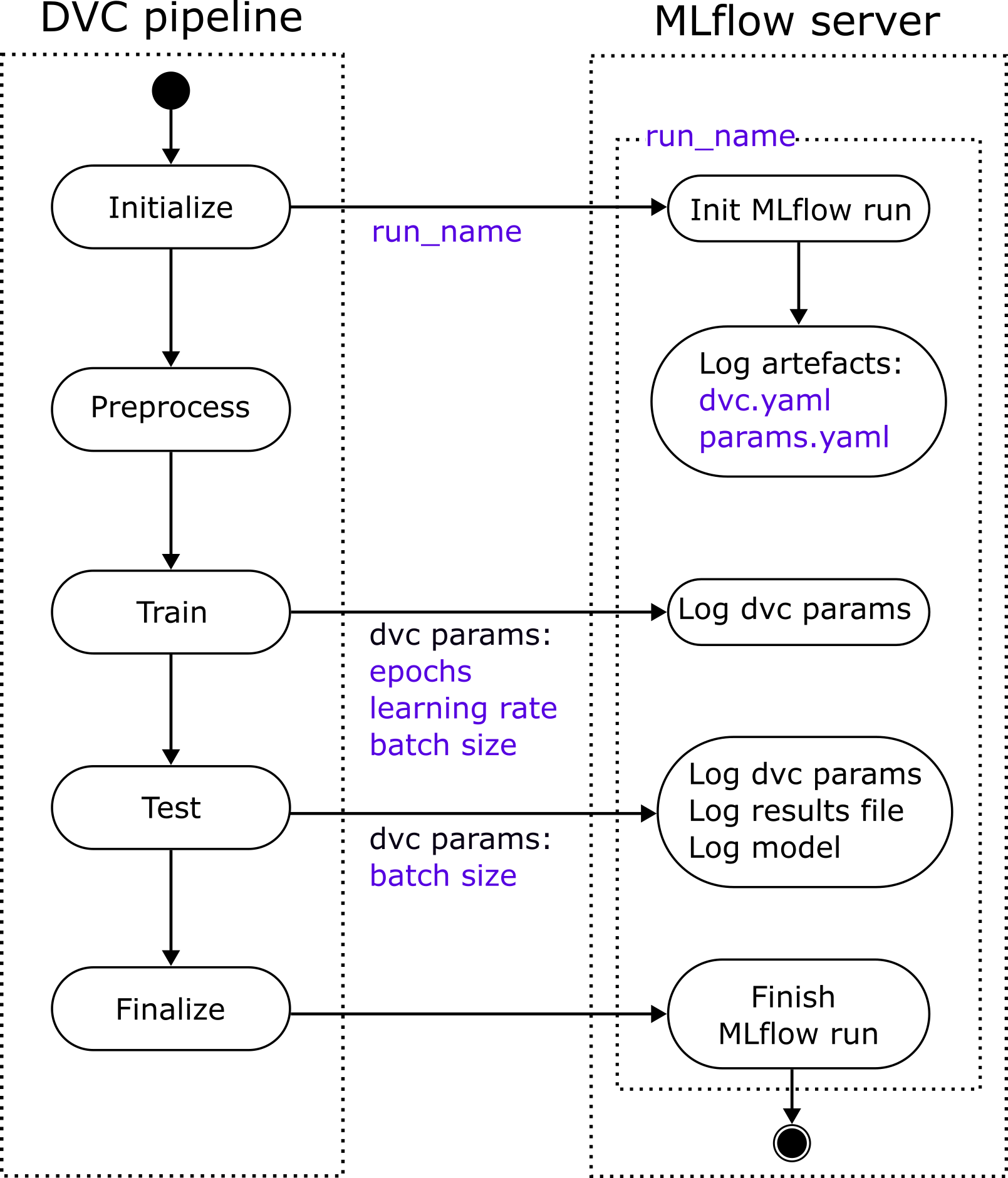
As seen in the flow chart, parameters defined in the DVC pipeline are forwarded to a MLflow server that captures information related to the ML experiment for each run of the DVC pipeline. The integration between the DVC pipeline and the MLFlow tracking server is at the core of this template.
The pipeline in the template contains a dummy Torch model that will run without complaints but not perform anything useful. However, the dummy components may easily be replaced with others that are more suitable for the task at hand.
Introduction to DVC and MLflow
In the following, we will give a short introduction to DVC and MLflow. If you are already familiar with the two frameworks, you may skip this section and go straight to the template walk-through
DVC in a nutshell
Data Version Control, or DVC in short, is a popular open-source framework for ML experiment management and dataset versioning and storage. Popular speaking, DVC is 'git for data'. If you are unfamiliar with DVC, make sure to go through the excellent getting started guide, including the short video tutorials.
In this template, we will be using DVC's data and model versioning capabilities and data pipelines capabilities to keep track of our data and models.
MLflow in a nutshell
MLflow - like DVC - is a popular open-source platform for ML operations. Whereas DVC integrates as a layer on top of git and is invoked in the user's terminal, MLflow uses integrations into existing ML frameworks to extract information on model parameters and model performance. This information is stored in a dedicated MLflow reporting server that acts as a centralized repository for comparing model performance throughout different stages of the ML lifecycle. The server can also act as a model repository such that it is possible to look at any experiment and extract the corresponding ML model.
In this template, we will be using the tracking and model registry capabilities of MLflow. Specifically, we use the parameter, model, and artifact logging functionality. The template can be configured to talk to an existing MLFlow server or Emily can create a dedicated MLflow server using the reporting template.
Template walk-through
We will go through the following concepts that are used in the template:
- Data management using DVC
- Experiment management with DVC
- Experiment reporting with MLflow
- Deployment of model to production
Data management using DVC
One of the core features of DVC is the management and versioning of (large) datasets through extensions to the typical Git workflow. DVC uses Git to keep track of different dataset versions but does so by only keeping references to the data - not the data itself - inside the Git repository. This is desirable because the sheer volume of real-life datasets may quickly exceed the file and storage limitations of your typical Git service provider.
DVC supports both local and remote data storage, for instance on Amazon S3 or SSH. If the template
is connected to a MLflow server on the local machine, Emily will per default configure DVC to use
the local folder emilyDvcData as the remote storage location.
However, if the template is connected to a remote MLflow server, Emily will try to
create a DVC repository on the same server.
The DVC remote storage location may easily be changed using the
dvc remote command that will change
the DVC configuration stored in .dvc/config.
If one wants to keep data outside the DVC workflow, it is also possible to import data by running
emily mount
Experiment management with DVC
As mentioned in the core capabilities section, a DVC pipeline is defined in
src/experiments/dvc/dvc.yaml. The five stages initialize, preprocess, train, test,
and finalize are defined in this sequential order to form a Directed Acyclic Graph (DAG) that can be
inspected by typing dvc dag.
By using the knowledge from the graph, DVC will know how to re-run the experiment if certain stages
are changed. If hyper-parameters for the training steps are changed, only the stages in
the pipeline that depend on train should be re-run, e.g. test, and finalize.
For the stages prior to train, e.g. initialize and preprocess, DVC will resort to saved,
or cached, outputs from the previous runs.
This is the default behavior when the script scripts/run_experiment_with_caching.sh is run.
If caching is not desired, scripts/run_experiment.sh will always run every stage of the
pipeline when the script is invoked.
To take a deeper dive into the DVC pipeline, let's look at how the train stage in
src\experiments\dvc\dvc.yaml is defined:
 stages:
  train:
    cmd: python /workspace/src/experiments/stages/train.py --train-data-dir /workspace/data/preprocessed --model-dir /workspace/ml/trained_models
    deps:
    - /workspace/src/experiments/mlflow/runid.json
    - /workspace/src/experiments/stages/train.py
    - /workspace/data/preprocessed
    params:
    - train.epochs
    - train.learning_rate
    - train.batch_size
    outs:
    - /workspace/ml/trained_models
For people familiar with python's argparse syntax,
it can be seen that train.py is invoked with the arguments /workspace/data/preprocessed and
/workspace/ml/trained_models as inputs to the train-data-dir and model-dir arguments,
respectively. These arguments point to the directories where the training data and ML model are
located.
- deps: The
depssection lists the dependencies of the train stage. If any of these files or directories change, DVC will know that the stage should be re-run the next time that the DVC pipeline is run. - params: The
paramssection contains the hyper-parameters that affect the train stage of the ML algorithm. Epochs, learning rate, and batch size are shown as examples in this template. Other parameters could be optimizer type or network depth. The Emily template will load the parameters defined in the DVC pipeline and use them in the corresponding python methods (e.g.train.py). If any of the parameters change, DVC will also know that the stage should be re-run. - outs: The
outssection define where the output files from the stage are placed. A common output from the train stage would be the model weights. If a folder is specified inouts, DVC will cache all the files present in the directory. If you do not want to store an entire directory in the DVC cache, just specify individual files here.
The initialize, preprocessing, and test stages are defined in a similar fashion in
src\experiments\dvc\dvc.yaml.
Experiment reporting with MLflow
When the Emily project is created using emily build, the setup process will ask you for the
address of the MLflow reporting server.
If you already have an existing MLflow reporting server, you can specify the address here; otherwise,
Emily will set up a server for you that lives as a stand-alone Emily project.
In this template, MLflow is configured to seamlessly integrate into the ML workflow defined in
the DVC pipeline.
When the experiment is run using either the dedicated script (scripts/run_experiment_with_caching.sh)
or dvc repro, the parameters defined in the pipeline are forwarded to the MLflow server and grouped
with their corresponding stage.
The template also logs the trained model and the results file using MLflow's
log_model
and
log_artifact
methods.
These MLflow integrations are built into the python modules for each stage.
Another benefit of the integration is the automatic linking between stages. Each run of the DVC pipeline generates a unique run_id. The integrations defined in this template make sure that all the stages of a particular run share the same run_id such that they are properly grouped when the experiment is shown in the MLflow server. An example hereof is seen below where the stages are shown as a group in the second column to the left:
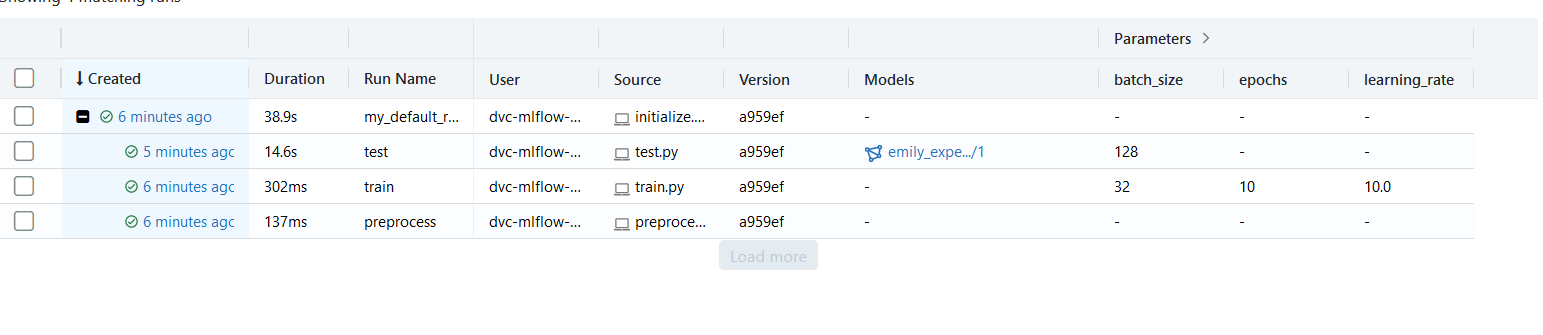
After the test stage, the trained ML model is uploaded to the MLflow server and linked to the specific run_id such that it may easily be retrieved later.
Deployment of model to production
The main functionality of this template revolves around performing experiments on a local machine using both the DVC pipeline and the integrations to the MLflow reporting server. However, once the model experimentation phase is over, it may be beneficial to deploy the ML model to a hosted solution in the cloud or on a dedicated server.
There are three pre-defined API endpoints in this template:
- /experiments/train: For training a model on data stored on the server.
- /experiments/test: For testing an existing trained model on data stored on the server.
- /production/predict: For using a finished model to predict the response to data that is sent through the endpoint.
The endpoints are defined using FastAPIs APIRouter callback and integrates seamlessly into the individual stages of the pre-defined ML framework of the template.
Train and test endpoints
The train and test endpoints serve as shortcuts for training and testing the model once it is deployed. When the endpoints are used, the functionality of the DVC pipeline is not in use. However, the results of the train and test sessions are still linked to the MLflow server. The train endpoint requires input that is formatted according to the following specification:
class TrainRequest(BaseModel):
    data_dir: str
    model_dir: str
The arguments data_dir and model_dir are paths to the location of the training dataset and
the ML model, respectively. This requires that the data and model to train are readily available on the
local storage of the server. If this is not desired, modifications are easily made to the endpoint defined
in src/experiments/router.py.
The test endpoint is defined in a similar fashion alongside the train endpoint.
Both endpoints are implemented as background tasks which means that the caller will not have to wait for the training or testing to finish before recieving a response. If the training or testing request is recieved successfully by the server, the caller will recieve a message stating that “Training/testing initialized successfully”.
Predict endpoint
The predict endpoint is different from the train and test endpoints. It supports data input directly
from the data transfer object (DTO) of the API call and it allows for fetching the trained ML model from either
local storage or the MLflow server. The endpoint is defined in src/prections/router.py and accepts input
according to the following specification:
class PredictionRequest(BaseModel):
  sample: Union[List[int], List[float]]
which states that the model accepts input as either a list of ints or a lists of floats, suitable for e.g. time-series or image data. If the model is changed to accept text input, the format can be changed here.
The predict endpoint can retrieve either a model from local storage or the MLflow server
depending on how the
environment variables are set in environments/dev/.emily.env. The /dev/ part will vary based on the
specific environment in use. The model selection process is illustrated
in the flowchart below:

Deploying the model
Once the endpoints have been adjusted to satisfy the requirements of the given task, deployment of the project can easily be performed by typing the following command in a terminal:
emily deploy <project name | project id>
For more information on the deployment capabilities of Emily, refer to the CLI documentation on deployment and deploy.